How the Wind Waker HD camera patch was made
Sun 26 July 2026In this post, I'll recount how I created the third person camera patches for the Wind Waker HD, as in how I found out what to patch in order to be able to play the game without constantly having to fight the camera controls that I just couldn't get used to.
At the time of writing, this happened over 6 months ago, so some details may be fuzzy, and I simply cannot remember all the dead ends I met, but I'll try my best.
Part I - surely I can toggle this in the settings... right?
One evening in January, I decided to finally start playing the Wind Waker HD on my Wii U, but I immediately started having problems with the third person camera controls, as I like to play with what's usually referred as inverted axes.
With great surprise, I couldn't find any option to invert the Y axis in the game settings, only one to invert the X axis (which is, in my experience, an anomaly, since a lot of games do offer an option to invert the Y but not the X), and with even greater surprise, no one online had made a patch for it.
So, the very next day, armed with Cemu on my PC and absolutely no prior knowledge on how the game internally worked, I started digging.
(Note that the initial research was done using the European release of the game, since that's the one I was playing on)
The first thing I thought to do was to find any and all memory locations where the game stores the reading of the Y axis of the right stick, so that I could study how the game uses it and either negate it, or make a patch to have the code responsible for moving the camera read it as negated.
(I do know from experience that memory locations will move around between different sessions due to memory being allocated differently)
I immediately jumped to Cheat Engine (which means that I was using Windows for this), knowing from experience that stick readings are usually stored either as a float/double ranging from -1 to +1, or as an integer where 0 is the lowest position, and whatever the maximum value of the data type the code is using as the highest position, or vice versa.
But after a few minutes of not being able to find anything, I remembered PowerPC is big endian, so even if I did find anything, it likely wouldn't've been useful.
I dug around the Cemu UI a bit, and found out that it supports logging for different things, including internal CafeOS modules that are reimplemented in the emulator, one of them being Input API, and that by enabling it the emulator starts dumping logs regarding the VPAD, which is how code on the Wii U calls the Gamepad.
I looked around the source code of the emulator, and sure enough, found the reimplemented module handling the Gamepad under src/Cafe/OS/libs/vpad/vpad.cpp; inside that file, there's a function called VPADRead, whose name is pretty self-explainatory, and it takes as one of it's arguments a VPADStatus pointer which is where it dumps all the inputs read from the Gamepad, including 2D vector variables for each analog stick.
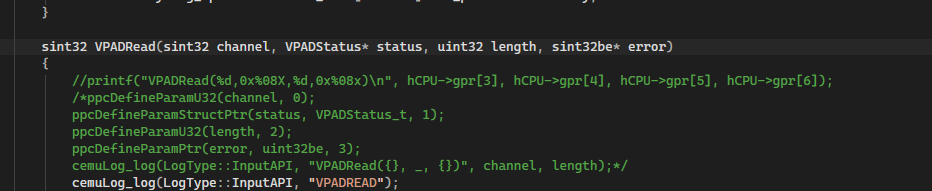
So I added two extra lines of codes, one of which logs the reading of the Y axis of the right stick, and sure enough...

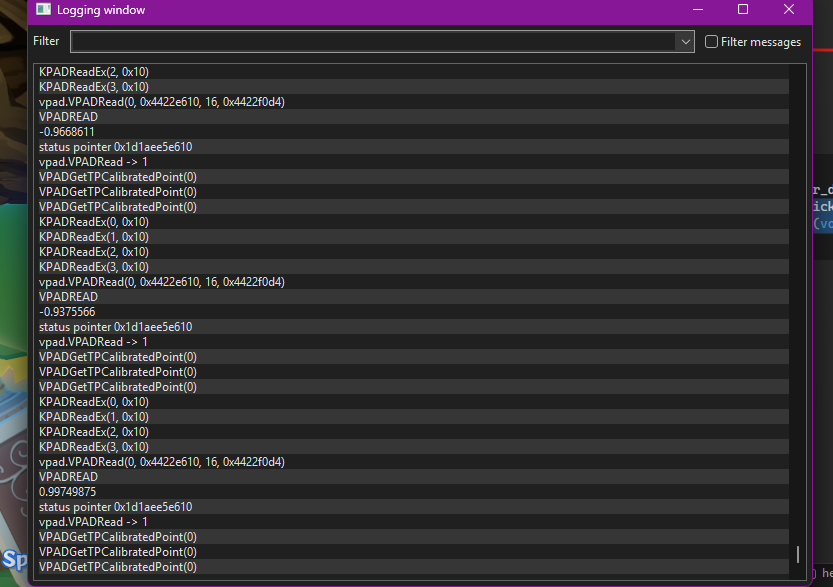
(logging window example with me rocking the stick up and down; logging the location of the status pointer turned out to be unnecessary)
Good, so I now had a way to know exactly what value the code reads as the Y axis; as it turns out, Cemu also offers a memory search feature, so I did the usual dance of moving the stick to a location, doing a memory search of the current Y axis reading, then moving it to another location, filtering the previously found values to discard ones that actually are unrelated, and rinse and repeat until all of those are gone.
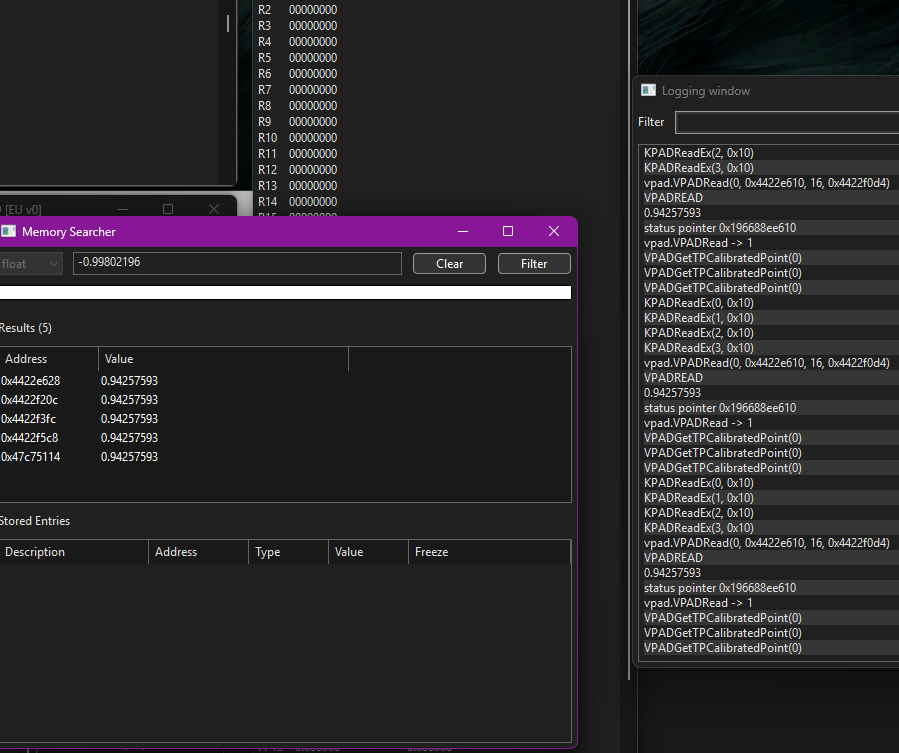
I narrowed it down to five memory locations, so now I had to find which one was the one that was being used by the game code to move the third person camera; the method I used to achieve this is pretty unglamorous: one by one, I froze each memory location in the list, and then checked if the camera stopped moving vertically (and if it affected the other locations I found, for example if freezing one causes all others to stop updating, it's probably not a good idea to mess with that one).
I'd like to recreate this process right now, but for some reason the freeze checkbox isn't working as I'm writing, so just take my word for it (in general, I have to say that the Cemu debug tools are... pretty broken, other issues I've enountered are the Restore original instruction feature not working on patched code half of the time, breakpoints acting weirdly, and sometimes the whole emulator would straight up crash after doing certain actions) (or maybe the freeze checkbox never worked, and I resorted to noping out code writing to those memory locations, I can't really remember)
After finding out the correct location (or at least one that looked very promising), I started placing read and write breakpoints on it to try and trace which code interacts with it and how, and I found this.
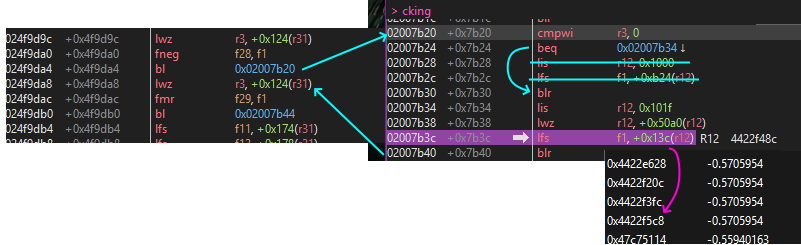
noping the lfs instruction highlighted in the picture above, while it does cause the camera to stop responding to vertical movements of the right stick, also causes it to move diagonally when doing horizontal movements, and also affects the first person camera movement.
However, by following the code back to after the bl instruction, you can see the instruction fmr f29,f1 which copies the value it just read between two floating point registers... and by noping THAT instruction, only the third person camera stops responding to vertical movements, with no weird side effects.
And finally, after reading a bit on PPC assembly, I found out that the fneg instruction works like fmr, but also negates the number in the target register; so I patched that in and... it worked!
So I quickly created a patch for Cemu in form of a graphic pack, then I also made the same patch for the Japanese and North American releases (which as it turns out, only move the relevant code around by an offset of one or two instructions), then spent way too much time creating a whole Aroma plugin to patch the game on real consoles too (because of course there's no mature, or frankly even functional, cheat engine homebrew for Aroma...)
And so I went back to playing the game on my Wii U, until I entered the Sinking Ships minigame place, where I suddenly found the camera moving the wrong way round.
At first I was extremely confused... did my patch fail somehow? Apparently not, since even after disabling it, the Y axis would still invert in that room.
Part II - what were they thinking?
Well, time to fire up the debugger again...
Returing to the instruction I patched previously, I noticed that the code soon after saves the value it just copied to another memory location, which is actually one of the other ones I had found while doing memory searches (and noping this instruction out too would cause the camera to stop moving vertically), so I put a read breakpoint on that to find what accessed it.
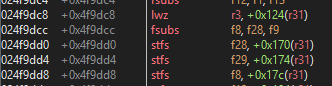
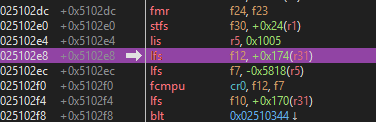
This portion of code is really dense and complex, with a lot of branches and conditionals, so I finally loaded up the game executable in Ghidra (shoutout to GhidraRPXLoader!).
After studying this code a bit, I came to the conclusion that only now was I looking at the actual function that calculates camera movement, with a portion of the code that delas with reading the axes of the right stick, adjusting them (as an example, it seems to skew the reading of the axes by snapping them to ±1 if their reading is above/below ±0.75, while also multiplying the reading by a constant if that condition is false to make it a continuous function), and other related calculations.
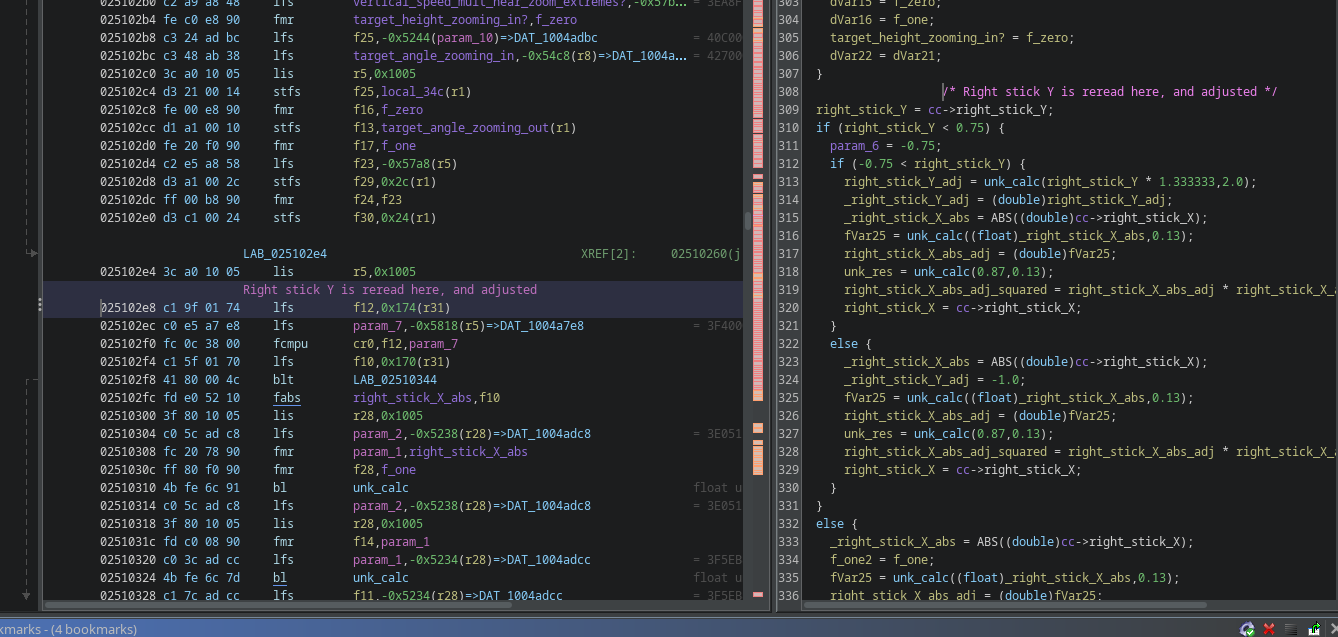
Unfortunately, due to the sheer complexity of this code, and the numerous functions it jumps back and forth from, trying to figure out how the game ultimately decided in which direction to move the camera vertically just by looking at it was proving to be difficult.
So instead, I tried looking at the floating point registers, noting down their values both on the island and inside the minigame location, and seeing if I could spot anything interesting.
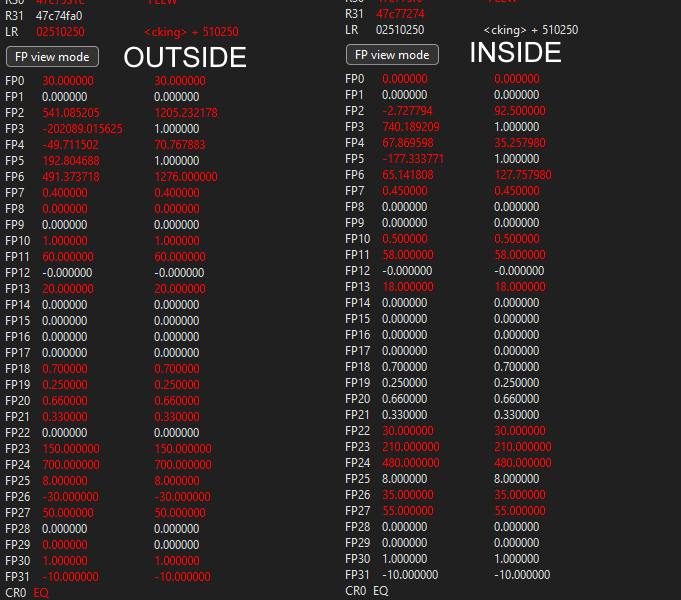
(ignore the right column, those are previous values the registers used to contain, the current ones are on the left)
FP26 caught my eye, as it was the only one whose sign would invert between the two locations and remain constant inside a location, and I soon realized that if I manually changed it's value while holding the stick up, it would cause the camera to move towards a different angle, with positive values making the camera move above Link, and negative values below.
So I used Ghidra to find other locations where that register is used in, and I found it being passed as a parameter to a function being called, along with another variable that's loaded into a register right before branching.
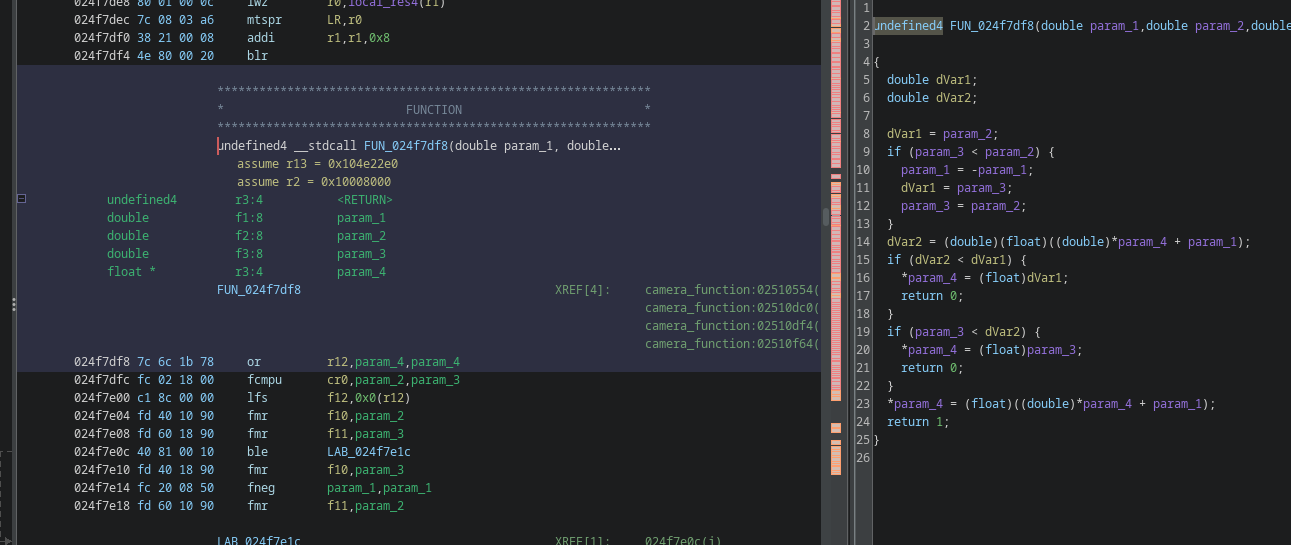
So I again compared the values held in the FP registers outside and inside, right before the branch.

And here I finally realized how the vertical camera movement works in this game: at this precise moment, FP2 holds the target/max angle the camera moves towards when zooming out, while FP3 holds the target/max angle the camera moves towards when zooming in (and fyi, FP1 contains an adjusted reading for the Y axis, which I'm not sure if at this point is some sort of angular speed); and I also confirmed by manually modifying their values that which one is the biggest determines the direction the camera moves in when you move the stick up or down.
Now if you ask me, associating the vertical movement of the right stick to zooming in or out, rather than the direction the camera moves, is a terrible idea that goes against the intuition of anyone that has ever played with a controller, especially when you make it so that the direction the camera moves is not even consistent; I honestly can't explain how anyone would think it's a good idea, and how nobody complained about it during playtesting.
Anyway, all I needed to do now was write some custom code that inverts the Y axis reading only if, say, the zoom in target angle is smaller than the zoom out target angle (doing it this way ensures it only applies to the few places that have the axis inverted compared to the overworld).
By looking at Ghidra, I determined that the ideal location for this was actually right after the instruction that reads the Y axis in the camera function, as at that point the code has already determined the final value for the target angles (there are some conditional statements, whose logic or reasoning I didn't bother figuring out, that set target angles manually instead of using the ones passed to the function), but has yet to perform any calculations on any of the data (the first data it does calculations on is, in fact, the Y axis reading, so I was afraid that negating the reading further down could cause unintended side effects).
And so I wrote a tiny snippet of assembly that compares the target angles and negates the Y axis reading only if the zoom out angle is smaller than the zoom in angle, and... this too worked!
And then I spent a few extra days adding this patch to the Aroma plugin, as I couldn't for the life of me figure out how to use libfunctionpatcher for it.
A lot more possibilities
While I'm personally done and satisfied with what I managed to achieve, I can't help but notice just how many parameters the camera function contains, and what could be achieved by studying the code further.
For example, I found two parameters governing the distance the camera moves to when zooming in or out, as well as many other that did stuff I couldn't quite put my finger on.
I'm pretty sure that, if someone was willing to, a pretty comprehensive camera mod could be written for this game, allowing anyone to tweak how it functions as they desire.
Bonus: hidden camera mode?
Here's something I yet have to document anywhere.
While I was looking at the code in Ghidra, I noticed a conditional statement with a suspicious body where a lot of variables are manually set.
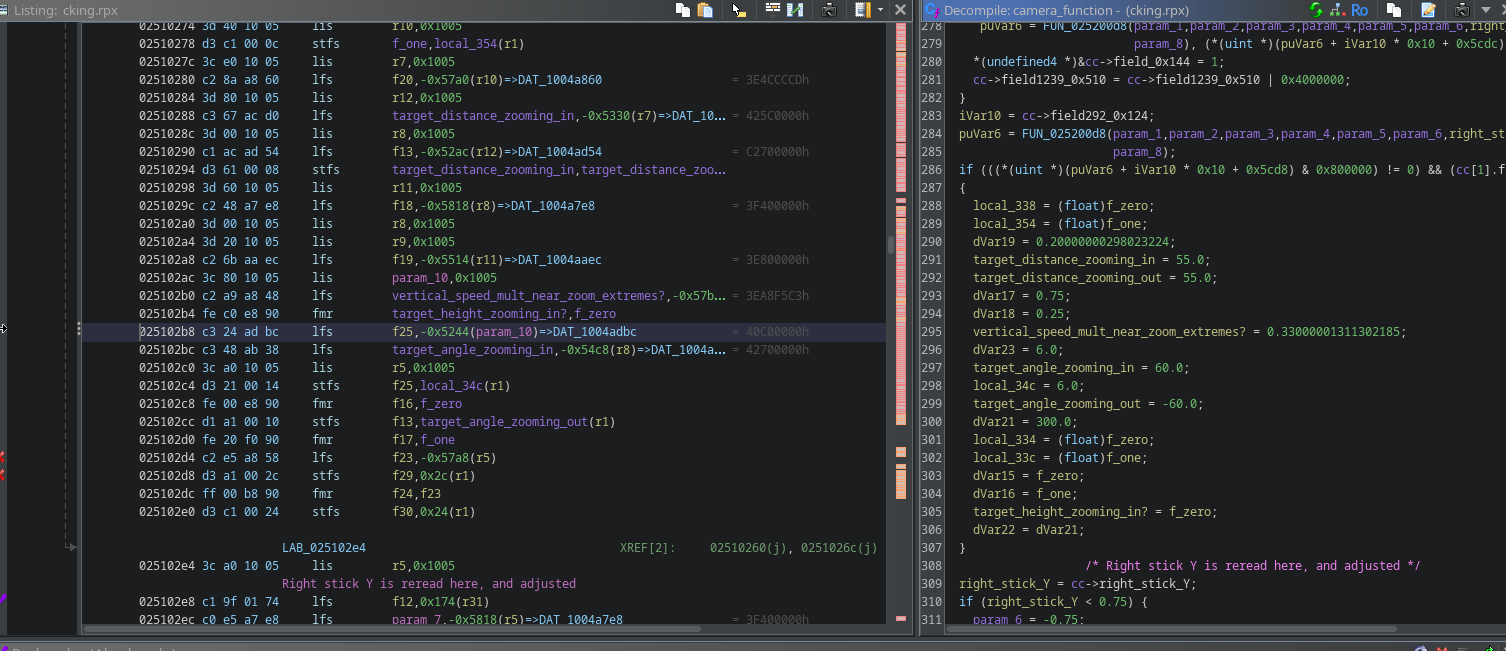
If you patch the code to forcibly enter it, it seems to activate an alt camera mode, where it stays at a constant distance from Link (unless there are obstacles, like the floor, in the way) and lets you move much further up or down in certain locations.
I may be wrong, but I don't think this is actually used in any location of the game? But it's entirely possible it is used and I just didn't realize.